
 Total Git
Documentation / Read-only preview
Set up once.
Stay inside TC.
Total Git is a native WDX64 content plugin. Install it, configure its startup condition once, then use Total Commander normally. Start with a disposable TC configuration and test repositories.
Preview distribution is being prepared. A package download will appear here when published. Read the installation guide in the meantime.
Requirements
The 0.3.0-preview.7 x64 preview requires Windows x64, TC 11.02 x64 and Git for Windows on PATH. Package users need no compiler or PowerShell. Check git --version in a new terminal and restart TC after installing Git so it receives the new PATH.
1. Install a supplied preview ZIP
- Select
total-git-0.3.0-preview.7-x64.zipin TC and press Enter. - Accept the content-plugin installation prompt. Choose a directory writable by your Windows user if the proposed folder is protected.
- The installed folder contains
totalgit.wdx64,README.htmland the icon. OpenREADME.htmlfor the offline English/Hungarian guide.
2. Configure startup once
- Open Configuration → Options... → Color → Define colors by file type... → Add... → Define.... In Define selection → Plugins, check Search in plugins:.
- Set Plugin totalgit, Property Startup, OP =, Value 1.
- Choose Save. In Save parameters, enter TotalGit startup as Template name and confirm. TC returns to Specify file type with
>TotalGit startupentered. - Choose OK and accept any color in Color. In File types, drag the rule to the first position if other rules exist. Choose OK in Define colors by file type, then OK in Configuration. Close and restart TC.
Startup always returns 0, so Startup = 1 never matches and never applies its color. Evaluating this rule loads Total Git inside TC. Its first position ensures that earlier matching color rules cannot skip the evaluation. This adapts the TC author's documented startup technique.
3. Browse repositories
After restarting your configured TC, open a repository in either panel. Its Git line follows the nearest worktree, including in empty or filtered subfolders. Panels and tabs remain independent. After external Git changes in an unchanged view, press Ctrl+R or F2. Automatic refresh keeps your active panel; the other panel's custom-column cells catch up when you focus that list. No periodic Git polling is used.
If a Git line is completely missing, first check plugin loading and activation: the WDX registration, enabled color rules and the first-position TotalGit startup condition, then restart TC. A missing Git executable can instead produce a visible unavailable line. For that state, check git --version in a new terminal and restart TC after correcting PATH.
Choose the Git-line position
Right-click either Git line → Total Git settings.... Choose Below the path (default) or Below the file list, above TC information. Apply previews in this TC; OK saves; Cancel, Escape or X restores the opening position; Reset previews the upper default. Both panels change together, keeping independent repository contexts.
The dialog displays its dedicated totalgit.ini next to TC's suggested INI. Startup and preview never write it. Invalid settings use the upper default; save failures remain visible. Separate configuration directories isolate settings. Instances sharing a directory share the last successful OK; Apply/Cancel cannot overwrite another instance's save. Different /I filenames in one directory may still share this location. Upgrades contain no default INI; removal leaves the dedicated file for optional cleanup after all hosting TCs close.
Optional child columns
Under Configuration → Options → Custom columns, add [=totalgit.Branch] and [=totalgit.State] to a view, then select it with Shift+F1. The Startup field is a search loading condition, not a display column.
Inspect changed files
Right-click the required panel's Git line → Changed files.... One resizable modeless window belongs to each TC. The heading identifies the left/right panel, current directory, worktree root and branch. It follows that panel's directory/tab, including empty or filtered subfolders; selecting a child repository does not retarget it. Opening from the other Git line retargets the same window. The list covers the whole nearest worktree.
Path is root-relative. Separate Index / staged and Working tree columns can both contain a change for one path; an em dash means no change on that axis. Details / original path shows rename/copy sources, conflicts and submodule flags. Deleted paths remain listed; ignored-only files are excluded. A submodule is a parent-worktree row rather than a recursive file list.
Use Refresh after external changes, or F2/Ctrl+R in the TC file list. Summary and details share one guarded background snapshot. A completed fresh result updates the display even when counts/content are unchanged; an outstanding refresh can still show stale. Resolving/updating, clean-empty, no repository, non-local/bare/metadata, unavailable and ownership refusal are distinct; failures withdraw earlier successful rows.
The display retains at most 10,000 rows or 4 MiB of path text, with an explicit shown/full-total notice when limited. A failed query or output beyond the guarded 8 MiB budget is unavailable, never partial clean. Resize or scroll for long paths. Escape, X or Close closes the window; Tab navigates its controls. Enter/double-click on a row performs no action. No file/editor/diff opening, history, export or Git writes are offered. Background results keep the active TC panel.
Disable startup, upgrade or remove
To disable startup, remove the TotalGit startup color rule and restart TC. Optional custom columns can still load the plugin. TC's cm_UnloadPlugins command is not a persistent disable switch: a later startup-rule or custom-column evaluation can load Total Git again, and the next Ctrl+R alone is not guaranteed to reload it. Before upgrading the DLL, close every TC that loaded it, install the new ZIP into the same folder and restart the configured TC.
For complete removal, delete the startup rule and saved search, remove Total Git custom-column fields, unregister the plugin under Configuration → Options → Plugins → Content plugins (.WDX) → Configure, close every TC that loaded it and delete its installation directory. TC's ZIP plugin installer has no automatic uninstaller.
Developer source-build trial
This advanced section is for contributors who already have access to the private source repository. Developers need Visual Studio 2022 C++ tools, the Windows SDK and CMake in addition to Git. Build and validate the package, then follow the same installation/startup steps in an isolated TC configuration:
git clone https://github.com/VargaJoe/total-git.git
cd total-git
git switch develop
./scripts/build.ps1
ctest --test-dir build -C Release --output-on-failure
./scripts/package.ps1
Do not overwrite a DLL loaded by TC. Close every instance using that DLL before updating it, or use another build and installation folder. Developer scripts are not included in the user ZIP.
Repository ownership
If Git rejects local ownership, Total Git shows Git: skipped | ownership not trusted; WDX cells show not trusted. Rejected discovery stops before status or changed-path scanning. Total Git does not add trust exceptions or change permissions. Who owns the GitHub remote does not determine this local trust check.
Verified scope and limits
0.3.0-preview.7: local acceptance is complete for the recorded TC 11.02 x64 / 96 DPI scope. The current frozen package includes the filter-caption correction. Native checks cover whole-worktree rows under a filter hiding every file, the 420-row list with scrolling, independent panels and empty cold starts, light/dark themes, larger fonts, close/reopen and explicit refresh behavior.
These checks do not establish wider compatibility or a general CPU improvement. An active UI Automation observer produced high CPU in recorded diagnostic conditions; a controlled foreground interval passed after that observer was removed.
- Other TC releases, 32-bit, physical high/mixed DPI, archives, FTP, search results, brief/thumbnail views and broader large-load behavior remain unverified.
- Applicable executable clean/process filters, including Git LFS, and partial-clone/promisor configurations show unavailable.
- Ownership refusal remains explicit; Total Git does not change Git trust or permissions.
- Commit, stage, branch switching, history/diff and remote operations are not exposed by Total Git.
Evidence and image provenance
The homepage screenshot is an actual TC 11.02 x64 capture from a disposable fixture during the earlier native display milestone. It is cropped to exclude the registered user's title bar; no application text, status or path was replaced. It demonstrates the native lines, not the new ZIP startup lifecycle.
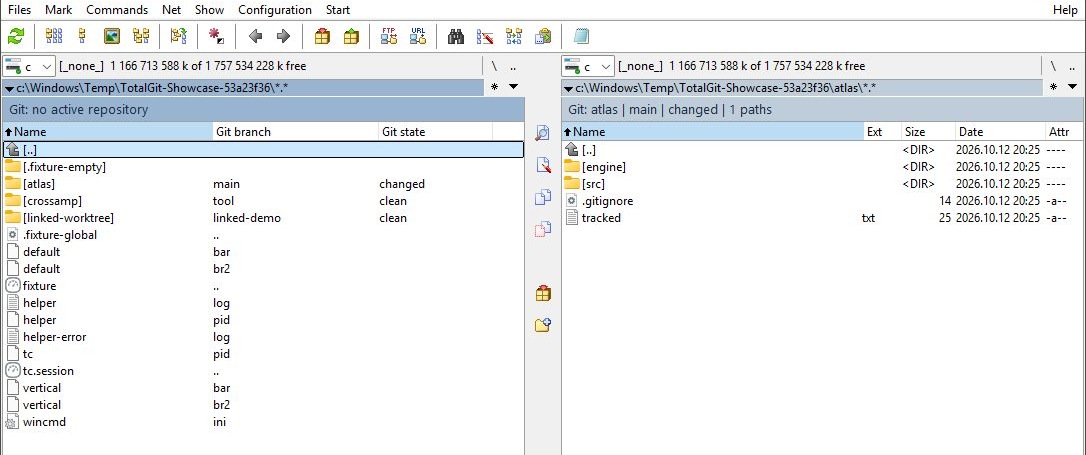
The merged M1 evidence and support matrix contain detailed prior scope. GitHub references require repository access.
Questions and feedback
A public support channel will be listed when distribution is opened. For a directly supplied preview, use the channel through which you received it. Include TC version/bitness, display scale, theme and the exact installation and navigation steps. Remove personal paths and credentials from screenshots.